
Electrical Estimating Software Built for Contractors
Feed in drawings or talk through the scope — TIBR builds neat, checklisted quotes with clear assumptions.
- Commercial & light-industrial electrical contractors
- Service teams quoting small works and call-outs
- Design-build shops needing rapid budgetary pricing

- Organized sections for gear, feeders, devices, lighting, and controls
- Alternates & value engineering structured by zone/phase
- Standard assumptions for permits, testing, and commissioning
- Clean, readable exports for clients and GCs
No credit card required.
The electrical estimating problem
Bids bog down in device counts, panel schedules, lighting controls, and mismatched vendor formats. Spreadsheets hide missed scope and slow value engineering. TIBR structures quotes so you move faster and defend margin.
- Missed devices, feeders, and terminations → costly change orders
- Unclear assumptions around permits, testing, commissioning
- Manual formatting → slow responses in competitive bid cycles
How
works for electrical contractors
- Capture scope fast. Talk through drawings and intent (devices, feeders, lighting zones, controls). Paste notes from walks and plans.
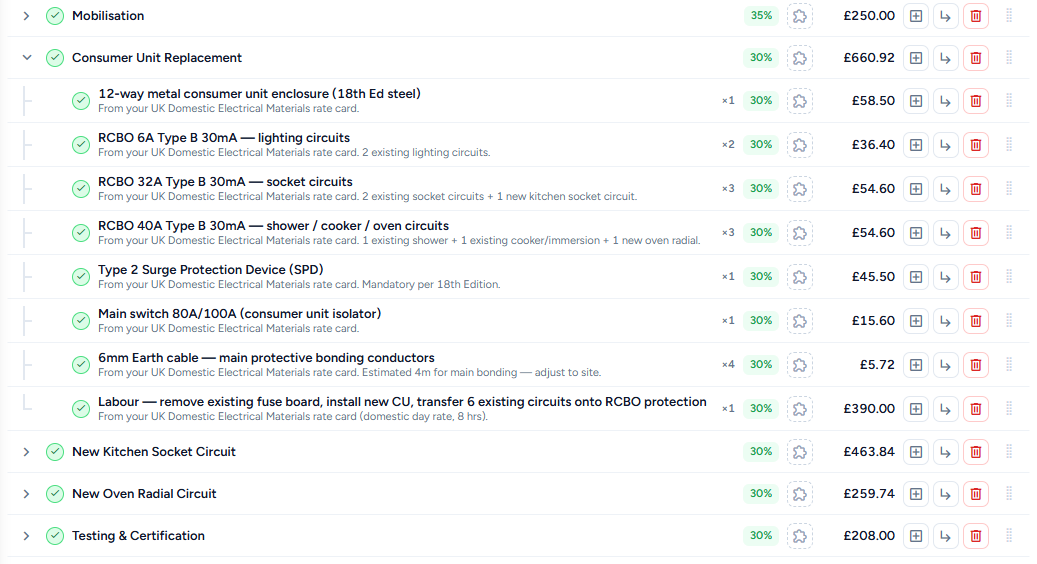
- AI builds the estimate. Organized sections for rough-in, devices, gear, feeders, terminations, testing.
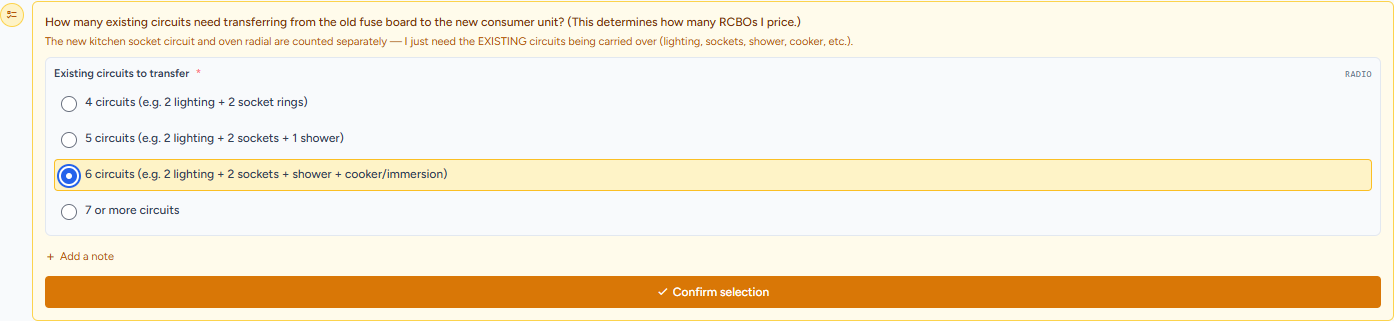
- Guided prompts. Nudge for gaps (GFCI/AFCI, labeling, temp power, as-builts, O&M docs).
- Assumptions, clarifications, exclusions. Standard language to de-risk award and reduce RFIs.
- Export & share. PDF/Word/CSV or a branded proposal link with version history.
How an electrical bid actually works in 
You get the drawings for a 3-story office TI — 200 devices, 4 panels, fire alarm tie-in, and a generator dip tube the mechanical engineer buried in a spec note. You talk through the scope: "new 200A panel per floor fed from the existing switchboard, 40 circuits of receptacles and switches, 60 high-efficacy LED troffers on 0–10V dimming, fire alarm notification appliance circuit extension, and a 30A generator connection with a manual transfer switch." Within seconds the estimate is broken into sections: gear and distribution, feeders and conduit, branch circuits and devices, lighting and controls, fire alarm, low-voltage, and temp power.
Then the prompts start. Terminations at both ends of every feeder? Labeling for panels, circuits, and disconnects? Fire alarm conduit and wire — separate from power? Generator dip tube connection and ATS wiring? Testing and commissioning allowances? Permit fees? You confirm or dismiss each one, and the line items adjust. That generator connection the ME hid on sheet M-401? It's already in your bid instead of surfacing as a $12,000 change order after award.
Because you bid a similar 3-story TI last quarter, TIBR pulls that job's structure and pre-fills device counts, labor rates, and feeder pricing you can adjust floor by floor. You add an alternate for occupancy-sensor switching instead of manual, attach your standard clarifications and exclusions, and export a branded PDF with every section itemized. Total time: same day, not two days of counting and formatting.
TIBR vs. estimating electrical jobs by hand
Most electrical contractors still estimate by highlighting devices on drawings with a colored marker, tallying counts on a scratch pad, and pricing feeders from memory or a spreadsheet that's six versions out of date. Panel schedules get maintained in a separate file nobody can find on bid day. The proposal goes to the GC as a flat-rate number — maybe with a one-paragraph scope letter — and two weeks later you get a call asking where the fire alarm conduit is in your price. It wasn't, and now it's a change order you have to negotiate from a weak position.
In TIBR, that same job is structured by scope section from the start — gear, feeders, branch circuits, devices, lighting, fire alarm, low-voltage, temp power. Prompted checklists catch every termination, every accessory, every testing allowance. Your labor rates and device pricing pull from a library you maintain once and reuse across bids. The proposal exports section by section with device counts, labor hours, material costs, and alternates — the kind of detail a GC can actually read and compare against other bids. Same job, same day, and no phone call about missing scope.
Project types electricians estimate with 
Tenant improvement electrical. The bread-and-butter mid-market EC job — new panels, branch circuits, devices, lighting layouts, and fire alarm modifications in an existing building. The challenge is that every TI has the same general structure but different device counts, panel sizes, and fire alarm requirements. TIBR lets you start from a past TI template and adjust per floor instead of rebuilding from scratch.
Warehouse and distribution. High-bay LED lighting, heavy power feeds for dock equipment, low-voltage cabling, and limited access for conduit routing. The estimating risk is in the feeder lengths and high-lift labor premiums that don't show up in standard unit rates. TIBR prompts for height adjustments and access conditions so your labor hours actually reflect the job.
Design-build. Budgetary pricing through multiple rounds as drawings develop from schematic to CD. TIBR tracks each pricing iteration with version history so you can show exactly what changed between rounds — and what drove the cost delta.
Service and maintenance. Smaller scope, faster turnaround — T&M quotes, panel swaps, service upgrades, call-out pricing. TIBR handles flat-rate and T&M formats with saved rate cards so you can price a 200A service upgrade from the truck without opening a laptop.
Industrial and manufacturing. Motor controls, MCCs, process power, variable frequency drives, and classified-area wiring that general commercial templates don't cover. TIBR keeps industrial scopes in their own sections with custom checklists for hazardous location ratings, motor HP schedules, and control wiring — so nothing gets lumped into general power and underpriced.
Typical electrical scope sections covered
TIBR structures electrical estimates by scope section so every area of work gets its own line items, labor hours, and material costs. Instead of a single-page lump-sum bid, each section is priced, clarified, and checked for gaps independently.
- Switchgear & distribution
- Feeders & conduit
- Branch circuits & devices
- Lighting & controls
- Fire alarm
- Low-voltage & data
- Temp power & construction lighting
- Testing & commissioning
- Permits & inspections
Estimators
- Standardized sections for faster takeoff-to-proposal
- Alternates & VE organized by zone/phase
- Reusable libraries reduce rework
Project Managers
- Clear inclusions/exclusions minimize disputes
- Exportable BOMs & checklists for handoff
- Audit trail for revisions and approvals
Owners & GCs
- Readable proposals with apples-to-apples structure
- Transparent assumptions, fewer clarifications
- Faster decisions with cleaner comparisons
Typical scope elements covered
- Panels, switchboards, disconnects, and distribution gear
- Feeders, conduit, wire, terminations, and labeling
- Devices (receptacles, switches, specialty) and rough-in
- Lighting fixtures, controls, sensors, emergency/egress
- Temporary power, testing, commissioning, and closeout
Integrations & outputs
Exported proposals are organized section by section — gear, feeders, devices, lighting, fire alarm — with device counts, labor hours, material costs, and subtotals under each. Alternates and exclusions are broken out as appendices, and your company branding goes on the cover. GCs get a document they can compare line by line against other subs, not a flat-rate number with no backup.
Cost libraries store your device pricing, labor rates per unit (per device, per termination, per LF of conduit), and assembly costs for common packages. Update copper wire pricing once and it flows into every future bid. Export to PDF, Word, or CSV depending on what the GC requires.
Accounting integrations with QuickBooks Online and Xero are on the roadmap. See pricing for current plan details.
Results electrical teams see
A TI electrical bid that took two days of device counting and spreadsheet formatting now goes out same-day. The time savings come from not rebuilding the scope structure on every job and not manually tallying devices from drawings. Prompted checklists catch fire alarm conduit, terminations, labeling, testing allowances, and permit fees before you submit — so the items that typically surface as change orders are already in the number.
The proposals themselves change the dynamic with GCs. Instead of a flat-rate number with a one-paragraph scope letter, they get a section-by-section breakdown with device counts, labor hours, and material costs they can actually read and compare. Contractors using TIBR report higher win rates not because the price is lower, but because the submission is detailed enough for the GC to defend to the owner without a follow-up call.
How do I estimate an electrical job?
What estimating software do electrical contractors use?
How do you calculate electrical labor costs?
What's the fastest way to quote electrical work?
Does TIBR do takeoffs?
Can I store unit prices and assemblies?
Can I show alternates and VE options?
Does TIBR cover testing and commissioning?
Do you integrate with QuickBooks or Xero?
- Construction Estimating Software That Builds Quotes in Minutes
- Landscaping & Snow Quoting Software
- Roofing & Exterior Quoting Software
- Painting & Finishing Quoting Software
- Cleaning & Janitorial Quoting Software
- Millwork & Fabrication Quoting Software
- Carpentry & Joinery Quoting Software
- Events & Exhibitions Quoting Software
- Quoting Software for Agencies — Faster, Error-Free Estimates
- General Contracting Estimating Software That Wins More Bids
- HVAC Estimating Software Built for Precision
- Plumbing Estimating Software for Contractors
- Remodeling Quoting Software That Handles Every Detail
- IT Project Quoting Software for Modern Agencies
- Estimating Software for Healthcare and Clinic Projects
- Manufacturing Quotation Software for Complex RFQs
- Quoting Software for Maintenance and Service Teams